
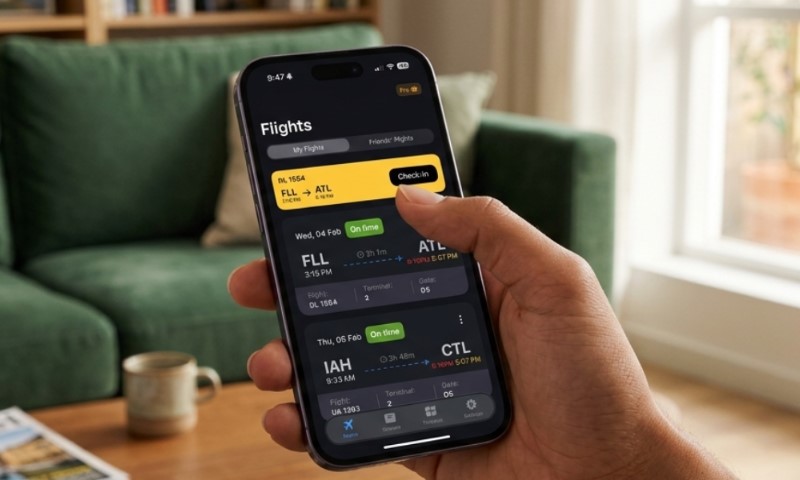
A solid flight tracker is your eyes in the sky, serving up flight numbers, routes, real-time aircraft positions, actual takeoff times, and estimated landings. It’s also your best bet for staying ahead of gate swaps, terminal shifts, and baggage claim chaos.
The expert play is a two-tier strategy: rely on your airline’s app or the airport boards for the official word on gates, then layer on heavy hitters like FlightAware, Flightradar24, Flighty, or FlightView to spot live movement and early delay red flags.
Heads up on the timing: FlightAware public tracking data usually runs about 30 seconds behind reality, and map icons can lag by a minute or two. Also, U.S. carriers are required to update your flight status within 30 minutes of any change for flights departing within the week.
The Flight Tracker Cheat Sheet
Trackers give you the pulse of an aircraft, even when gate info gets shifty right before boarding. Keep an eye on the core data: flight numbers, routes, scheduled vs. estimated times, actual wheels-up/down, aircraft specs, and where that inbound plane is currently hanging out.
| The Data | The Lowdown | The Pro Play |
| Scheduled time | The original time on the books | Your baseline logic |
| Estimated time | The most likely reality right now | Fixing your ride and connections |
| Actual time | Hard data on pushback and landing | Receipts for delay claims |
| Gate and terminal | Where the plane actually parks | Finding your way in the terminal |
| Aircraft map | Real-time visual of the flight path | Monitoring the cruise phase |
| Inbound aircraft | The plane coming in to pick you up | Spotting delays before they happen |
Flightradar24 notes that their airport boards offer terminal and baggage details when available. Stay sharp: airports might wait until the last minute to assign a gate or swap a stand, so what you see on the screen can evolve quickly.
Your Step-by-Step Tracking Routine
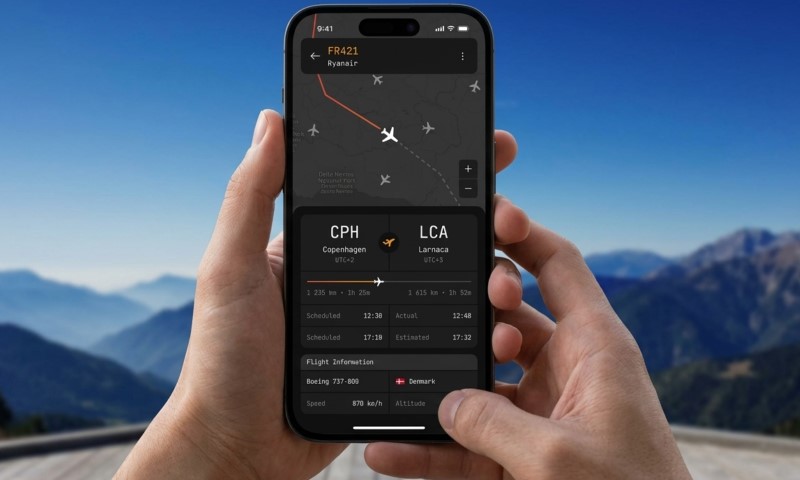
The quickest way to get the job done: grab your specific flight number, nail down the date, and cross-reference official airline updates with your dedicated tracker of choice.
Lock In the Flight Number
Always track using the operating airline’s flight number, not just the codeshare on your ticket. A flight from London to NYC sold by American might actually be flown by British Airways—stick to the metal that’s actually flying for the cleanest data.
The operating carrier owns the plane and the data; following that number keeps your info sharp and minimizes confusion.
Check the airline app first to see the operational view, then open FlightAware or Flightradar24 for the technical deeper dive.
FlightAware is a powerhouse for live tracking maps and delay stats across commercial, private, and general aviation sectors. It’s the ultimate bird’s-eye view.
Decode the Timeline
Scheduled is the goal; Estimated is the forecast. Actual times only drop once the doors close, the wheels lift, or the plane hits the gate. Pro tip: “landed” means the plane touched the runway, not that the passenger is at the curb.
Don’t forget the ground game. Taxi times, customs, and baggage claim can easily tack on 10 to 60 minutes depending on how big the airport is.
Watch Your Inbound Plane
The most elite way to spot a delay early is tracking the inbound aircraft. If your 3:00 PM flight’s plane is still in the air 30 minutes before takeoff, you’re looking at a delay, even if the airline hasn’t admitted it yet.
Flighty uses machine learning to crunch data from thousands of flights, offering delay predictions that sit right next to official times for a more realistic outlook.
This split-screen approach, as detailed in Flighty delay predictions, lets you anticipate trouble while still keeping the airline’s official time as your operational north star.
Set and Forget Alerts
Alerts are non-negotiable since airport reality shifts while you’re grabbed a coffee or charging your devices in the terminal.
According to Flighty notifications, you can toggle alerts for everything from gate changes to takeoff times. If you’re picking up family, turn on arrival pings. If you’re connecting, track both legs religiously.
The Tech Behind Live Tracking in 2026
Modern trackers blend aircraft signals with airline feeds and prediction models. ADS-B is the core tech here. Flightradar24 explains that most data comes from ADS-B signals sent by planes, broadcasting ID, location, speed, and altitude.
For older birds without full ADS-B, trackers use MLAT, which calculates position using receiver-based tracking across multiple ground stations to fill in the blanks.
FlightAware ADS-B receivers form a global network tracking planes worldwide. Coverage is stellar in major hubs, but keep in mind that oceans or conflict zones can still have tracking gaps. It’s fast, but it’s not quite a flight deck display.
In the States, the FAA ADS-B policy mandated certified equipment for most aircraft after 2020. This regulation is exactly why we can now follow commercial traffic with such incredible granularity and accuracy.
Nailing Your Gates and Terminals
Trust the airline app for gates, then double-check the airport screens once you’re airside. A tracker gives you the heads-up, but the final call happens within the airport’s own operational systems.
Gates change for a dozen reasons: a previous flight is running late, a jet bridge is acting up, or a crew needs to swap. Stay flexible and keep your eyes on the physical displays.
Here is the pro checklist for a smooth departure:
- Scope out the app immediately after checking in online.
- Verify everything again once you arrive at the airport.
- Check the big screens after you clear security.
- Re-confirm 30 to 45 minutes before boarding kicks off.
- Trust the gate agents if the app and the screens start conflicting.
Schiphol advises passengers that their app is a great resource, but terminal displays remain the ground truth. Schiphol gate guidance proves why checking a monitor is still vital, even in our app-first world.
How to Read Delays Like a Pro
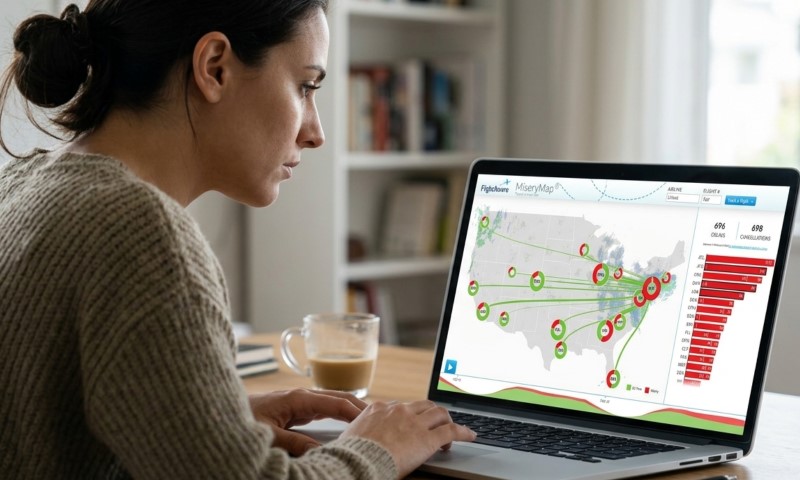
Evaluating a delay means looking at aircraft movement, weather, and airline logistics. Remember: blue skies at your gate don’t mean your flight is safe if there’s trouble on the route.
Flightradar24 experts remind us that route weather disruption is a major player in delays. Storms halfway across the country can ground your flight even if both your origin and destination are clear.
Know your status labels:
| Label | The Reality | Your Move |
| Scheduled | Everything is currently as planned | Keep it chill, stay alert |
| On time | The prediction aligns with the schedule | Stick to your itinerary |
| Delayed | Expect a later arrival/departure | Assess your connection buffer |
| Boarding | The gate is open for passengers | Get to the gate now |
| Gate closed | The plane is prepping for pushback | Find an agent immediately |
| Departed | The plane has left the gate | Track the takeoff progress |
| Airborne | The aircraft is currently in the air | Monitor the arrival estimate |
| Landed | Touchdown on the runway | Calculate taxi and bags |
| Arrived | The plane is at the gate | Time to head to the curb |
| Diverted | Landed at a different airport | Call the airline ASAP |
| Cancelled | The flight isn’t happening | Rebook via the app or desk |
Check the FAA’s National Airspace System Status to spot ground stops or regional delay programs affecting major U.S. hubs.
Picking Your Ultimate Tracker
@aaronrheins The COOLEST Flight Tracking Software #aviation #flighttracker #airline
Choose your tool based on the mission. Pick-ups need arrival precision; frequent flyers need deep alerts and inbound context.
| Service | Best For | Secret Sauce | Trade-off |
| Airline app | Boarding and rebooking | The official word | Not always the fastest pings |
| Airport websites | Baggage and terminal info | Tied to local operations | Limited flight history |
| FlightAware | Airport delays and mapping | Massive global database | Small lag on public maps |
| Flightradar24 | Visual aircraft enthusiasts | Top-tier ADS-B views | Gate info can be hit-or-miss |
| Flighty | Pro travelers on the move | Lightning-fast alerts | Requires a subscription |
| FlightView | Quick arrival checks | Clean, simple UI | Fewer deep technical specs |
| FAA Status | System-wide U.S. issues | Straight from air traffic | Doesn’t track gates |
FlightView by OAG is a solid choice for itineraries and weather. For the best experience, use FlightView flight tracking as a companion to your airline’s official app to get the full picture.
Real-World Scenarios
If you’re picking someone up, start tracking an hour before arrival. Wait for the flight to show as “landed” before you leave, and remember to account for taxiing and baggage claim time.
Connecting? Track both planes. Know your arrival gate and departure terminal beforehand so you can hit the ground running if the window is tight.
If a connection looks impossible, reach out to the airline via chat or the lounge desk immediately. Use your tracker’s data to back up your request for rebooking.
For baggage, stick to the airport’s own flight monitors once you land. Most trackers don’t always have live belt info, and those assignments can change after you hit the tarmac.
Handling Delay Claims
Keep your receipts: save screenshots of screenshots of notifications and gate changes, but remember that the airline’s internal logs are usually the final authority in claims.
Trackers provide great evidence, but eligibility for refunds or vouchers depends on the specific route, the reason for the delay, and the final arrival time.
In the U.S., the DOT’s Fly Rights guidance explains that while airlines aren’t mandated to pay for domestic delays, you are often entitled to a refund if you choose not to travel after a major schedule change.
EU travelers have more protection, with compensation for delays over 3 hours ranging from €250 to €600. The air passenger rights update is essential reading for anyone flying within Europe this year.
FAQs
Final Thoughts
A flight tracker is the ultimate travel hack for 2026, turning terminal anxiety into a manageable plan. Use your airline’s app for the official boarding calls and rebooking needs.
Trust the airport screens for the local ground game, and use FlightAware, Flightradar24, or Flighty to see the aircraft’s actual path and predict delays before the airline announces them.
The master strategy: confirm your flight info, compare official stats with your tracker, watch that inbound plane, and always keep your alerts active.
A tracker won’t fix a delay, but it empowers you to act fast, protect your connections, and stay one step ahead of the airport crowds.